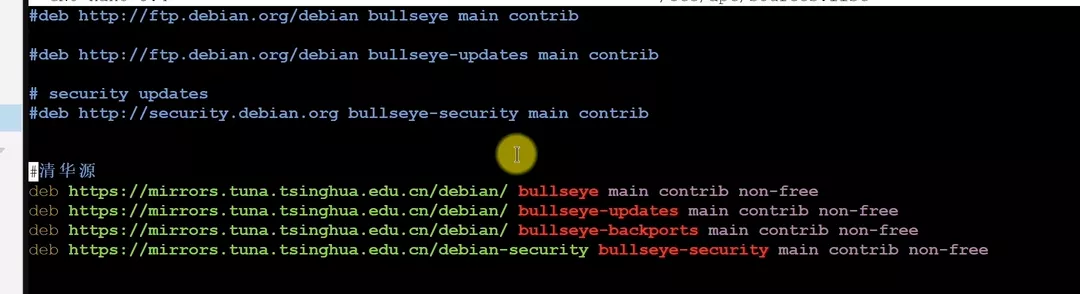
# 7.x清华源 deb https://mirrors.tuna.tsinghua.edu.cn/debian/ bullseye main contrib non-free deb https://mirrors.tuna.tsinghua.edu.cn/debian/ bullseye-updates main contrib non-free deb https://mirrors.tuna.tsinghua.edu.cn/debian/ bullseye-backports main contrib non-free deb https://mirrors.tuna.tsinghua.edu.cn/debian-security bullseye-security main contrib non-free
修改企业源
1
vim /etc/apt/sources.list.d/pve-enterprise.list
把默认的源注释掉, 添加pve7.x清华源
1 2
# 7.x清华源 deb https://mirrors.tuna.tsinghua.edu.cn/proxmox/debian bullseye pve-no-subscription
更新系统
1
apt update && apt dist-upgrade -y
升级完成 重启
1
reboot
升级PVE7.x为8.x
设置8.x源
编辑PVE8.x需要的源
1
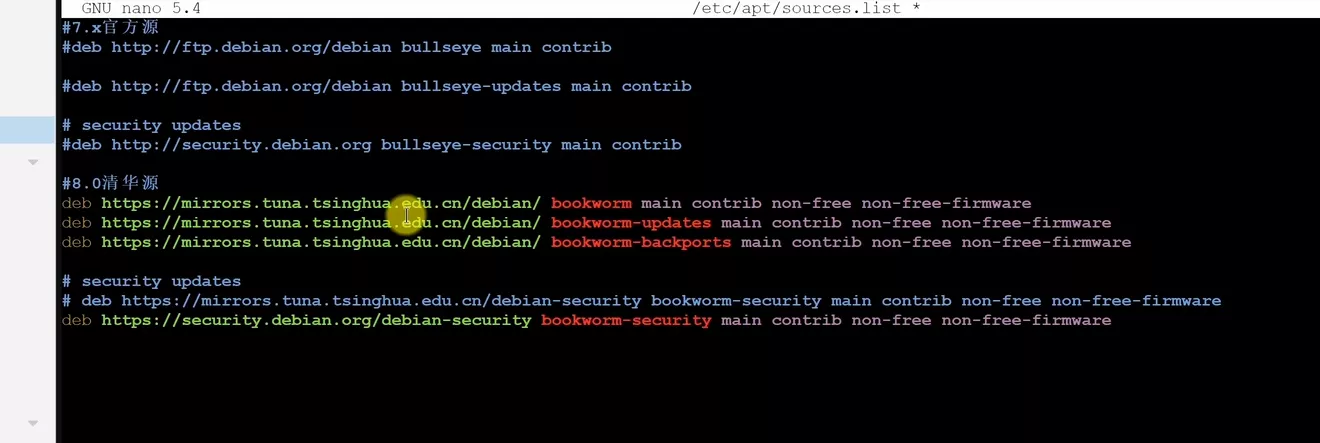
vim /etc/apt/sources.list
1 2 3 4 5 6 7
# 8.x清华源 deb https://mirrors.tuna.tsinghua.edu.cn/debian/ bookworm main contrib non-free non-free-firmware deb https://mirrors.tuna.tsinghua.edu.cn/debian/ bookworm-updates main contrib non-free non-free-firmware deb https://mirrors.tuna.tsinghua.edu.cn/debian/ bookworm-backports main contrib non-free non-free-firmware
# security updates deb https://security.debian.org/debian-security bookworm-security main contrib non-free non-free-firmware
编辑企业源
1
vim /etc/apt/sources.list.d/pve-enterprise.list
将7.x的企业源删除, 然后添加8.x的源
1
2
# 8.x清华源
deb https://mirrors.tuna.tsinghua.edu.cn/proxmox/debian/pve bookworm pve-no-subscription